Motorola Razr 70 review – This foldable gets the fun stuff right
Our Verdict

The compact design is genuinely convenient, the external display is useful enough to change how I use my phone, battery life is strong, and the main screen looks fantastic. Most importantly, the Motorola Razr 70 feels like a phone with some personality.
- Great build quality
- Excellent displays
- Solid battery life
- It has personality!
- Cameras are serviceable
- Still quite expensive
- Not the strongest gaming option
I’m a firm believer that phones should be fun, not just practical. That’s why I’m a fan of what Nothing and Honor have been cooking up over the last few years. However, I’ve also been keeping an eye on Motorola, especially its revival of the Razr.
Back in the day, I swapped my brother’s Samsung D500 for my mum’s Dolce & Gabbana edition Razr V3i. It was the talk of the town, or, more accurately, my bedroom. Plus, Tony Stonem carrying one on Skins only cemented its cool factor. But nostalgia only gets you so far. Is the Motorola Razr 70 worth checking out in 2026, and how does it compare to some of the best flip phones on the market?
I’ve spent two weeks with the Razr 70, and while it has some drawbacks, I’ve got something to confess: I’m a flip phone convert once again.
Price and availability
The Motorola Razr 70 starts at $799.99 / £799.99 for 8GB RAM and 256GB storage. UK retailers have already dropped the price below launch, with the phone available for around £749 at the time of writing. That puts it towards the more affordable end of the foldable market, although £749 is still a lot to spend on a smartphone.
Specs
Here are the Motorola Razr 70’s specs:
| Battery | 4,800mAh |
| Display | 6.9-inch LTPO Extreme AMOLED, 120Hz (2,640 x 1,080 pixels) |
| External Display | 3.6-inch AMOLED, 90Hz (1,056 x 1,066 pixels) |
| Chipset | MediaTek Dimensity 7450X |
| Storage | 256GB |
| RAM | 8GB |
| Front camera | 32MP |
| Back cameras | 50MP main with OIS, 50MP ultra-wide/macro |
| Weight | 188g |
| Dimensions | 171.30 x 73.99 x 7.25mm (unfolded); 88.08 x 73.99 x 15.85mm (folded) |
| Colors | Pantone Hematite, Sporting Green, Bright White |
Performance and gaming
The Dimensity 7450X isn’t flagship silicon, but that’s not necessarily a dealbreaker. For everyday use, the Razr 70 feels smooth. Apps open quickly, multitasking is comfortable, and I never found myself waiting around for the phone to catch up. I love how snappy this performance extends to the external screen, too.
Watching TikToks, YouTube, and even testing movie apps is amusing, though I wouldn’t necessarily sit through an episode of Lanterns or a whole movie this way. Gaming is a different story. Casual games run well enough, but this isn’t the phone I’d choose if gaming was my priority. If you really want to, you can play free mobile games like Call of Duty: Mobile on the outer panel.
It’s harder to control, of course, and there’s a small trade-off in frame rate, but it’s doable. The controls are optimized to the screen size, but if you’ve got hands like mine on the bigger side, it’s a little awkward. Again, I’d just open it up and play in full screen.
Features and software
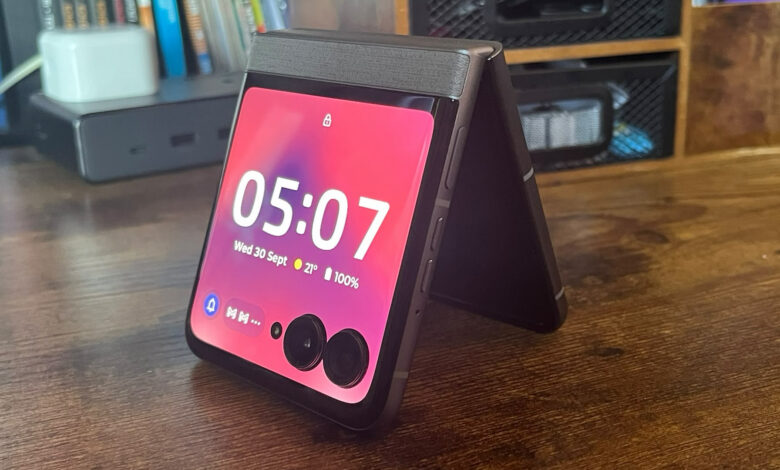
The Razr 70 runs Android 16 with Motorola’s software layered over the top, including Moto AI and a collection of typical gestures and shortcuts. To harp on it again, the star feature is arguably the 3.6-inch external display. Motorola lets you interact with apps, respond to messages, control music, and use navigation without opening the phone.
Whether I’m using it to control Spotify on my TV while I make food, hopping into WhatsApp quickly, or having a brief social media scroll in the cinema before a movie starts, it’s all ready to go without opening the phone completely. It makes the cover screen genuinely useful rather than a glorified notification panel.

There’s ample customisation available, too. I can assign an array of applications and swap between different panels on the external display. If you’d prefer to have your calendar available at a glance, with an easy route into other apps, you can do it. On my home screen, there’s a decent selection of iPhone-like layouts, with a few handy widgets to apply.
I’ve had some issues with notifications coming through, though. Despite selecting my preference for how it should show me notifications, it often reverts back to its default form. This is likely a bug, and hopefully it’ll get patched out.
One thing that has surprised me is how much I’ve started using Motorola’s movement gestures. I find myself using the ‘torch shake’, as I’ve started to call it, every night when I leave my PlayStation 5 to finally settle into bed. Shake the handset quickly with a flick of the wrist, and the torch comes on. There are other simple gestures like this that the Razr 70 incorporates, adding another dash of fun to proceedings.
My biggest software complaint is Motorola’s update policy. The Razr 70 gets up to three years of OS upgrades, while Motorola’s UK support information currently lists security support through 2030. That’s reasonable, but some rivals, including Samsung, now offer considerably longer support.
Design
The Razr 70 is a reminder that phones don’t have to be boring. Motorola offers the phone in Pantone Hematite, Sporting Green, and Bright White, with finishes that give it considerably more personality than most smartphones. At 188g, it’s also relatively light for a foldable. More importantly, it becomes wonderfully compact when closed, while opening it gives you a full-sized 6.9-inch display.

The 15.85mm folded thickness means it isn’t the thinnest flip phone around, but the design feels deliberate rather than purely functional. The titanium-reinforced hinge and IP48 protection add some reassurance. The latter isn’t mind-blowing in 2026. The included case for the top and bottom of the phone is a nice addition, but its design isn’t exactly exciting. You may want to invest in a third-party case if you want some style.
Display
Okay, so there’s something really important to note here. You can’t, at absolutely any point, remove the factory screen protector. Motorola warns that removing it can damage the display and void your warranty, and the phone makes this clear during setup.
That aside, this is a lovely panel for your eyes to feast on. The 6.9-inch LTPO AMOLED display runs at up to 120Hz and supports HDR10+ and Dolby Vision. It’s bright, colorful, and smooth, making it great for scrolling and watching video. Motorola lists a peak brightness of 3,000 nits, although its default brightness is considerably lower.

I worried the crease would be an issue, and while it is visible, it isn’t distracting. Looking at it directly, you don’t really notice; it’s only from certain angles that it becomes prevalent. After a couple of days, though, I stopped caring.
The Motorola Razr 70’s 3.6-inch external AMOLED display has a 1056×1066 resolution and 90Hz refresh rate, giving you a sharp, smooth panel for checking notifications, controlling music, replying to messages, and running supported apps. It also uses Gorilla Glass Victus for added protection.
Cameras
The Razr 70 has a 50MP main camera with OIS, a 50MP ultrawide/macro, and a 32MP selfie camera. It’s a sturdy enough camera, but its zoom isn’t very strong. The main camera takes good photos in daylight, with vibrant colors and plenty of detail. The ultrawide is useful when you need a wider perspective, although image quality drops in more difficult lighting.

For general Instagram-able photos for your grid, selfies, and everyday images, you’ll get on just fine. But don’t expect amazing clarity from afar if you’re zooming in. The cameras won’t compete with some of the best Android phones, but Motorola makes good use of the folding design. Flex View lets you prop the phone up for hands-free shots, while features such as Frame Match and Gesture Selfie give you more ways to experiment.
Motorola also includes features such as Photo Booth, Macro, Night Vision, and Twist to Capture. For many, the Camcorder feature for video is a neat feature. If you partially fold it and hold it like a Camcorder, you can record this way with dedicated touch controls. Tilting the phone sideways also auto-zooms – I love it.
Battery
The 4,800mAh battery is one of the Razr 70’s highlights. It’s a drop-down from my Nothing Phone (4a) Pro’s 5,080mAh capacity, but I haven’t noticed it too much. I’ve been happily leaving it unplugged overnight, waking up to around 30% to 40% battery.
Charging it up is a breeze, thanks to TurboPower charging. In my testing, it takes about 25 minutes to reach around 55% to 60% charge from empty when using a 30W charger. Wirelessly, you’re looking at slower times due to the 15W limit.
I comfortably made it through full days during testing without constantly worrying about the battery percentage. That’s particularly welcome on a foldable, where you’d expect the compact design to bring bigger compromises.
Should you buy the Motorola Razr 70?
The Motorola Razr 70 isn’t trying to win a specification war, and that’s exactly why I think it works. There are compromises, particularly around camera performance, gaming power, and software support, but none have stopped me from enjoying the phone.
In fact, the opposite happened: after two weeks, I found myself using features I never expected to care about, from the external display to Motorola’s little gesture shortcuts.
For $799.99 / £799.99, it’s not cheap, but if you’ve been curious about flip phones and don’t want to spend Ultra money, the Razr 70 makes a convincing case for taking the plunge. It might not be the phone for everyone, but it finally made me understand why people are flipping back.
Alternatives
Samsung Galaxy Z Flip5
As noted in our Samsung Galaxy Z Flip5 review, this is a good alternative if you want a more performance-focused flip phone with Samsung’s polished software and strong Snapdragon 8 Gen 2 chip. It launched at $999.99 / £1,049, making it pricier than the Razr 70’s $799.99 / £799.99 starting price, but it remains a compelling option if performance matters more to you than Motorola’s larger, more useful external display.
Nubia Flip 5G
The Nubia Flip 5G is one of the most affordable flip phones around, and its modest performance and camera setup reflect that. Even so, it has a stylish design, handles everyday tasks well enough, and offers impressively fast charging. It’s a solid way to get into the foldable phone market without spending a fortune. However, its availability can make getting hold of it tricky. Check out our Nubia Flip 5G review for a deeper breakdown.