Razer Prio review – compact and cheap, but not in a good way
Our Verdict

While the design of the Razer Prio is excellent and fits in your pocket, it feels cheap and quite flimsy, making it hard to justify the $100 price tag.
- Compact design
- iOS and Android compatible
While there are plenty of hardware brands in the mobile controller space, Razer is easily one of the most recognizable, right up there with the likes of Backbone and GameSir, the manufacturer I typically use for my accessories. Part of this success is due to the Kishi series, but it has something new to offer in the form of the Razer Prio, a nifty gamepad that fits in the palm of your hand – when not using it, at least – which I’ve just spent the last couple of weeks using.
The Prio’s portability is one of its main selling points, and it’s already one of the best phone controllers in terms of efficiency, with each side of the pad slotting together to keep it in a small form when not in use. As a result, the controller is also very lightweight, so you can settle in for a long session of mobile games like Genshin Impact and PUBG Mobile without fear of wrist cramp. However, for most of my testing, I used the PlayStation’s remote play feature, slugging home runs in MLB The 2026 and slicing people up in Marvel’s Wolverine.
While I initially loved the small design, and still do to a certain degree, there are a couple of caveats that I can’t ignore – the first is that if you happen to have big, sasquatch-like hands, this controller will infuriate you, as you’ll find yourself hitting the wrong button too often. I have quite dainty hands, yet I still hit the wrong button sometimes because they’re so close together at such a small size. However, all of the buttons, including the triggers, work perfectly; there’s no delay in input, and they don’t get stuck.
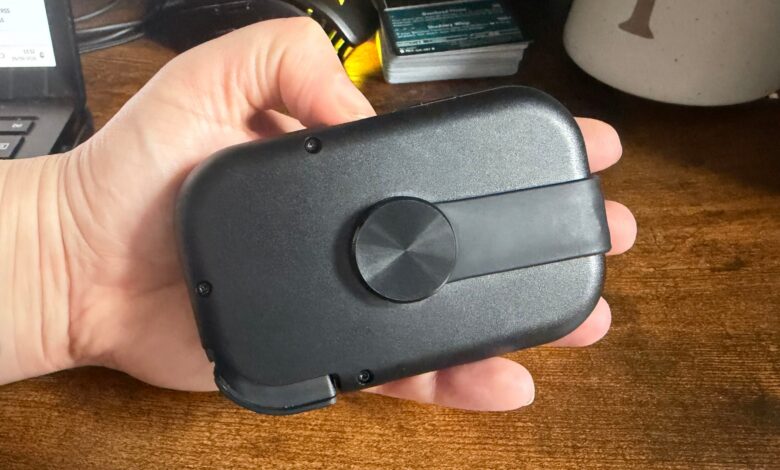
Another potential turnoff is that, despite being a $99.99 controller, the Razer Prio feels somewhat cheap. That became immediately apparent from the first time I held the device. Granted, for it to achieve its incredibly compact design when not in use, the controller can’t have a solid back, but even the left and right pads feel a bit cheap to the touch, with the back of the device not only feeling flimsy but also quite easy to bend.
I can’t deny that the design of the Prio is intuitive, and I applaud its portability and size – the way it slots together to fit into your pocket is excellent – but an accessory that costs $100 should feel like it’s worth every dollar, not like something I could get in the bargain bin. I will say, though, the slick black finish looks nice and gives the controller a clean aesthetic, and it pairs well with my orange phone.

You also don’t need to worry about it running out of charge, as the pad slots into your phone’s charging port and runs off that rather than using a Bluetooth connection. I also had no trouble getting the controller to work after connecting it, though it does try to direct you to the Razer mobile app – this is a bit annoying when you don’t actually need the app to use the controller. I don’t know about you, but I try to limit the number of apps on my phone, so if I don’t need it to use an accessory, what’s the point in having it? It’s also worth noting that there’s no pass-through charging available, meaning you can’t juice up your phone while playing.
Beyond my complaints about the feel of the controller, I also have a bone to pick about compatibility. Yes, you can absolutely use it with both iOS and Android devices, which is a positive, but it turns out it’s not the best fit for iPhone 17 Pro users. While the controller has a dip on the left-hand side to make room for your camera, it doesn’t account for the protruding camera on Pro models, which spans from one side to the other, so it doesn’t fit comfortably into the Prio unless you remove the rubber. If you do, your phone lacks that all-important grip, meaning it may move around a bit – this didn’t happen to me, thankfully, but it’s still something to bear in mind.
If the Prio cost $15 to $20 less, I’d be more forgiving of the cheap feel, but at $100, it’s a premium mobile controller that doesn’t feel like one, with a thin and flimsy design. If you want a controller that fits in your pocket and is perfect for portability, the Razer Prio is an excellent choice, but if you want true value for your money, maybe wait until the price drops a bit.